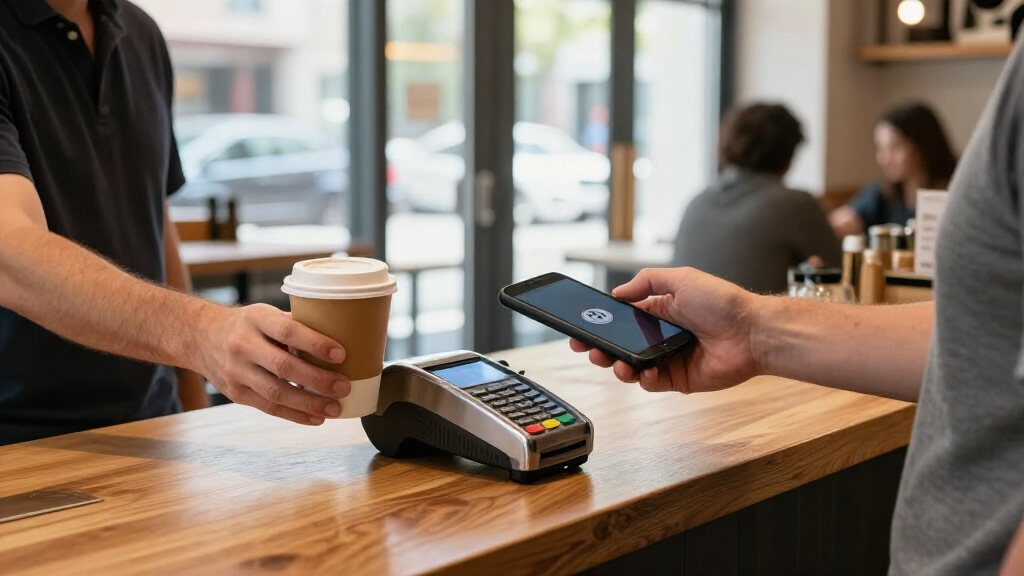

This checklist is for merchants exploring how to accept cryptocurrency at a counter, pop-up, or service desk. It covers the customer-facing pieces and supporting equipment, with compatibility and workflow in mind.

Get hardware and tech essentials delivered free with Prime
- Fast, free delivery on millions of items
- Prime Video, Amazon Music and more included
- Member-only deals all year
The sections follow the checkout path: payment hardware and display first, then a tablet, receipt printer, and secure storage. Where no specific product is listed, the section offers selection advice instead of naming a pick.
Before buying, confirm which payment service and checkout software you plan to use, then check their device requirements. Use each section to compare connections, fit, and daily handling against your actual counter setup.
Bitcoin point-of-sale terminal
A point-of-sale terminal is the center of a crypto checkout, so the first decision is whether a dedicated device is needed at all. With no specific product pick here, start by checking the payment provider’s supported hardware and checkout flow. A terminal that cannot run the required app or connect to the needed peripherals may add steps instead of simplifying checkout. Provider compatibility should guide the shortlist.A common mistake is choosing hardware based on appearance or a familiar label without checking how transactions are created, confirmed, and recorded. Ask whether checkout depends on a network connection, what staff see during a pending payment, and how the device handles an incomplete or canceled transaction. Match the screen and controls to the people who will use it, and consider counter space, power access, and whether it must move between stations. Real workflow fit matters more than a generic terminal description.
Before committing, confirm the operating system, required ports, and any supported reader or printer connections with the provider. Keep a clear fallback process for checkout interruptions, and make sure staff can distinguish payment status from a customer’s wallet screen. Verify the full setup with the service you intend to use.
What to look for:
- Written confirmation that the payment provider supports the terminal and its operating system
- A clear on-screen payment status for staff and customers
- Required power, network, and peripheral connections
- Screen and controls suited to the counter and checkout pace
- A documented fallback process for interrupted checkout
NFC payment card reader
An NFC reader can offer a tap-based interaction, but its usefulness depends on the payment service and checkout software supporting that exact reader and transaction flow. No product is specified for this slot, so treat compatibility as the starting point. Confirm whether the provider supports NFC payments in the way your business intends to accept them, and whether the reader needs a separate phone, tablet, or terminal. Support must be explicit before hardware selection.A frequent buying mistake is assuming that any contactless reader can handle a crypto payment. Card readers and crypto checkout flows may serve different purposes, so check the provider’s documentation rather than relying on a product label. Ask which devices pair with the reader, how pairing works, and what staff must do to confirm a payment. Consider where the reader will sit, whether it needs a cable or charging, and whether customers can reach it comfortably. Understand the complete flow before adding a reader to the counter.
Check the reader’s connection method and supported operating systems against the checkout device you already plan to use. Confirm who supplies software updates and how the reader behaves if its connection drops. If the provider does not list a specific model or supported method, get clarification before purchase. Match the reader to the service, then test the proposed arrangement in your actual checkout layout.
What to look for:
- Provider documentation naming supported NFC reader models or methods
- Compatibility with the checkout device and operating system
- Clear pairing steps and payment-status guidance
- A suitable cable, charging, or placement arrangement
- A documented response to connection interruptions
QR code payment display
A QR display gives customers a visible place to scan during checkout, but the listed pick is an Instagram stand with a QR code, not a product identified specifically for crypto payments. Before using it, confirm that its code can be replaced with the payment QR your checkout service generates. A fixed social profile code may not suit a flow that creates a new code for each transaction. Code behavior is the key fit question for this slot.One common mistake is assuming that a stand labeled with a QR code can display any payment code. Check whether the code is printed, changeable, or shown on a separate screen, and whether customers can scan it from their normal position at the counter. The stated dimensions are 4.1 x 2.7 inches, so compare that footprint with the space available and consider whether it will remain visible among other checkout materials. Visibility and replaceability both matter.
Confirm how the payment service presents its code, including whether staff need to update it for each transaction. If the service generates changing codes, a static stand may only serve as a sign directing customers to another screen. Keep instructions concise and make sure the displayed code points to the intended checkout experience. Validate the live flow before putting the stand in front of customers.
What to look for:
- Whether the printed QR code can be replaced or updated
- Compatibility with the payment service’s QR-code workflow
- A visible scan position for customers at the counter
- A footprint that fits the available checkout space
- Clear customer instructions that match the actual payment flow
QRLynk NFC Instagram Stand with QR Code, 4.1 x 2.7 in

This compact PVC stand lets customers open a configured Instagram profile by tapping its NFC chip with a compatible phone or scanning the QR code. Its protective laminate is water and scratch resistant for indoor or outdoor use, and setup involves peeling and placing it in a visible spot.
Pros:
- Offers both NFC tap and QR code access
- Water and scratch resistant
- Suitable for indoor and outdoor placement
- Does not require an additional app or subscription
Cons:
- NFC access requires a compatible smartphone
- Profile access depends on configuring the Instagram destination
Best for: Merchants who can use or replace the stand’s QR code for checkout
Not ideal for: Businesses needing a changing payment QR displayed directly on the stand
Bottom line: Check whether the payment QR can be displayed or updated before choosing this stand.
Tablet for payment checkout
A checkout tablet can host the payment service and keep transaction details visible to staff, but the listed pick is an Android 16 kids tablet with a stylus and case. The product name alone does not establish compatibility with a merchant payment app, receipt printer, or reader. Confirm that the checkout software supports its Android version and that the tablet has the connections your setup needs. App and peripheral support should determine whether it fits this role.A common mistake is treating the listed memory and storage figures as proof that a tablet is suitable for business checkout. They do not establish app support, update policy, reliable connectivity, or access to required settings. The included case and stylus may be useful for handling, but check whether the case allows access to ports and whether the stylus suits the checkout workflow. Consider screen readability, mounting or counter placement, charging access, and who can change device settings. Business readiness needs checking beyond the product title.
Before relying on the tablet, verify the payment app installation route, operating system support, printer connection options, and any restrictions on background activity or device management. Confirm that staff can keep the checkout app available and see payment status clearly. If the provider does not list this model or operating system, ask for confirmation and test the intended peripherals together. Check the whole checkout chain before deployment.
What to look for:
- Payment app support for Android 16 and this device
- Compatible connections for the planned printer and reader
- Case access to charging and peripheral ports
- A readable screen and practical counter placement
- Device settings and update support suited to staff checkout use
Android 16 Kids Tablet HD 10 Inch with Stylus & Case, 24GB RAM, 64GB ROM, 1TB Ex

This Android 16 kids tablet features a 10-inch HD display, parental controls, and a durable protective case with stylus, making it ideal for children ages 3-12. Powered by a high-efficiency processor with 24GB RAM and 64GB ROM, it supports expandable storage up to 1TB for educational and entertainment content.
Pros:
- Durable kid-proof case with adjustable stand
- Parental controls for safe usage
- Expandable storage up to 1TB
- Long-lasting 6000mAh battery
Cons:
- High storage capacity may be unnecessary for some users
- Heavy for very young children
- Limited information on software updates
Best for: Merchants whose checkout provider confirms support for this Android tablet
Not ideal for: Buyers who need guaranteed business app and peripheral compatibility from the product name alone
Bottom line: Verify the payment app and planned peripherals work with this tablet before purchase.
Receipt printer
A receipt printer can provide a paper record for a checkout, but the listed pick is the Star Micronics mC-Print3 Thermal Receipt Printer. The name identifies a thermal receipt printer; it does not establish whether it works with a particular crypto payment app or tablet. Confirm the app’s supported printer models and connection methods first. Software compatibility comes first for this slot.A common buying mistake is checking only whether a printer connects physically while overlooking whether the checkout software can send it a receipt. Confirm the supported connection type, required drivers or app settings, and what receipt content the payment service can print. Compare the printer’s intended placement with available counter space, power access, and the route for paper handling. Also check the paper specification and loading process against the records you expect to provide. Daily operation should be clear before adding it to the setup.
Ask the payment provider or software maker whether the mC-Print3 is supported with your exact tablet and app configuration. If a receipt is optional or digital, determine how staff will offer that choice and keep records. Test a complete transaction flow, including the printed result, before relying on the printer during service. Confirm model-level support rather than assuming a printer will work because it is thermal.
What to look for:
- Checkout software documentation supporting the mC-Print3
- A connection method supported by the planned tablet
- Required drivers, app settings, or setup steps
- Counter space, power access, and practical paper loading
- Receipt output that matches the business’s recordkeeping workflow
Star Micronics mC-Print3 Thermal Receipt Printer

The Star Micronics mC-Print3 is a high-speed thermal receipt printer capable of printing at 400mm/sec. It features USB-C connectivity, cloud printing support with CloudPrntNext, and is splash-proof and dust-proof, making it suitable for retail and hospitality environments.
Pros:
- Fast printing speed of 400mm/sec
- Supports multiple connectivity options including USB-C, Ethernet, and Bluetooth
- Splash-proof and dust-proof design for durability
Cons:
- Limited to monochrome printing
- Primarily designed for receipt printing, not versatile for other media types
- Requires compatible devices and setup for cloud printing features
Best for: Merchants whose checkout app confirms mC-Print3 support
Not ideal for: Buyers without a compatible app or confirmed printer connection method
Bottom line: Verify software and tablet compatibility before adding this printer to checkout.
Locking cash drawer
A locking drawer can help keep checkout materials together, but the listed pick is a three-drawer mobile file cabinet with a lock, rather than a product identified as a cash drawer. Consider whether a file cabinet suits the items and access pattern you need. It may not connect to checkout hardware or provide the opening mechanism expected of a point-of-sale cash drawer. Match the storage function to the checkout plan before selecting it.A common mistake is treating any lockable cabinet as interchangeable with a cash drawer. Check the drawer dimensions, locking arrangement, mobility, and whether its drawers suit the materials you intend to store. If you expect the drawer to open from a receipt printer or point-of-sale system, confirm that the product supports that connection; the product name does not establish one. Consider where the cabinet will sit, whether rolling placement is practical, and whether staff can access it without disrupting customers. Physical fit and workflow both deserve attention.
Clarify whether the purpose is secure storage, organizing supplies, or integrating with a checkout system. Those needs can call for different equipment. Confirm that the lock and drawer layout meet the intended use, and verify dimensions against the counter or nearby workspace. If you need a till-style drawer or automated opening, seek a product specified for that role and confirm compatibility with your checkout hardware. Choose by intended use, not just the word “lock.”
What to look for:
- A drawer layout suited to the materials being stored
- Dimensions that fit the counter or nearby workspace
- A lock arrangement appropriate for the intended access pattern
- Confirmation of any required point-of-sale or printer connection
- Mobility that works with the planned placement
STANI 3-Drawer Mobile File Cabinet with Lock, Rolling Metal Office Cabinet, Full

This sturdy, fully assembled metal filing cabinet features three lockable drawers with full-extension ball-bearing slides, providing secure and easy access to files. Its compact design with wheels makes it ideal for home or office use, accommodating various folder sizes and ensuring mobility.
Pros:
- Secure locking drawers with keys for added security
- Smooth full-extension ball-bearing drawer slides
- Compact and mobile design with lockable wheels
- Sturdy steel construction with rust-resistant finish
Cons:
- Casters require attachment upon delivery
- Limited to three drawers, may not suit larger storage needs
- No adjustable shelves inside drawers
Best for: Merchants seeking a mobile, lockable cabinet for checkout materials
Not ideal for: Businesses needing a till drawer that integrates with checkout hardware
Bottom line: Use this cabinet only if its storage layout and lock meet the checkout need.
Buy in a practical order: first confirm the payment provider and software, then choose compatible checkout hardware. Next settle the QR workflow and tablet, followed by a printer if the app supports it. Add lockable storage after deciding what it must hold and whether it needs to connect to the checkout. Compatibility first helps avoid equipment that cannot perform its intended role.
Use the checklist to ask focused questions before ordering and to compare each item with your counter, staff routine, and payment flow. A little confirmation up front makes the final setup easier to use. Build one working checkout step at a time, and you can shape the equipment list around how your business actually accepts payment.