

Choosing a hardware wallet is a choice about how you will approve transactions and manage recovery, not just where you will store a device. The Ledger Nano X and Trezor Safe 5 are both established options for keeping private keys off everyday internet-connected devices, but they take different approaches. The Nano X adds Bluetooth for phone use and supports a broad range of assets through Ledger’s software ecosystem. The Safe 5 puts a color touchscreen and tactile confirmation at the center of its experience, and Trezor emphasizes open-source design.

Get hardware and tech essentials delivered free with Prime
- Fast, free delivery on millions of items
- Prime Video, Amazon Music and more included
- Member-only deals all year
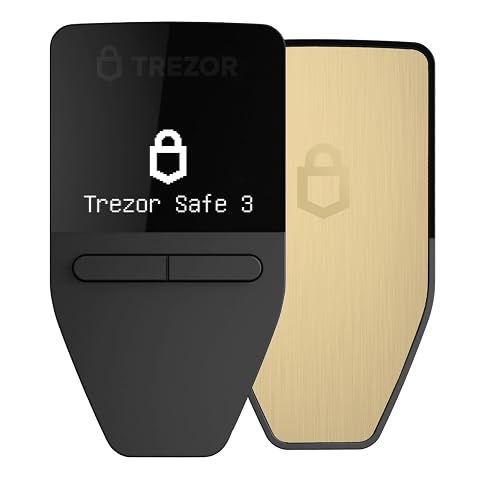
Trezor Safe 3 Crypto Hardware Wallet with Secure Element
- ✔ Security element: EAL 6+ secure element
- ✔ Display: OLED screen
- ✔ Backup: Multi-share backup; two wallet backup cards included

Ledger Nano X – Classic Crypto Wallet with Bluetooth
- ✔ Display: 1.1-inch display
- ✔ Connectivity: Bluetooth, NFC, and USB listed
- ✔ Mobile support: iOS and Android

Trezor Safe 7 Crypto Hardware Wallet with Bluetooth and Color Touchscreen
- ✔ Security architecture: TROPIC01 chip plus EAL 6+ secure element
- ✔ Display: High-resolution color touchscreen
- ✔ Connectivity: Encrypted Bluetooth and USB-C
That tradeoff matters most if you expect to manage crypto on a phone, want a particular coin or token, or care about inspecting the wallet’s software and hardware design. Mobile-first users and people whose assets are supported more conveniently by Ledger may prefer the Nano X. Users who value on-device clarity, a larger screen, and open-source transparency may prefer the Safe 5. Neither device removes the need to protect a recovery phrase, verify transaction details, and buy through a trustworthy channel.
At a Glance
| Criteria | Ledger Nano X | Trezor Safe 5 | Winner |
|---|---|---|---|
| Transaction review | Small device screen; transaction details depend on the specific operation and supported app. | Color touchscreen gives more room to review and confirm transaction information on-device. | B |
| Mobile connectivity | Bluetooth and USB-C; designed for phone as well as computer use. | USB-C connection; no built-in Bluetooth for wireless phone operation. | A |
| Asset coverage | Broad support through Ledger Live and third-party wallet integrations; verify specific assets before purchase. | Broad support through Trezor Suite and compatible wallets; check support for each asset and network. | Depends |
| Software transparency | Ledger publishes much of its software, but the secure element firmware is not fully open source. | Open-source approach makes more of the design available for public inspection. | B |
| Everyday usability | Compact, portable design with a small screen and button controls. | Larger touchscreen and tactile confirmation make device interaction more direct. | B |
| Recovery and backup | Recovery phrase backup; optional Ledger recovery services and backup features vary by setup and region. | Recovery phrase backup, with supported backup methods depending on setup and firmware. | Tie |
| Price and value | Often a lower-cost choice than the Safe 5; strong value for mobile use and supported assets. | Typically costs more; premium is most defensible for its screen, interaction, and transparency preferences. | A |
Trezor Safe 3 Crypto Hardware Wallet with Secure Element
The Trezor Safe 3 is the most balanced choice in this comparison for buyers who want a dedicated signing device without paying in complexity for a large screen or wireless-first design. Its EAL 6+ secure element adds a hardware security layer, while the OLED screen lets us confirm transactions on the device. That second step matters: a wallet is only useful as a signing safeguard when we can inspect what it is being asked to approve.Compared with the Ledger Nano X, the Safe 3 emphasizes an open-source design and a simpler, less mobile-centered setup. It has no Bluetooth feature listed, so it is better suited to a desk or a deliberate USB-connected routine than to managing assets on the move. Against the Safe 7, it gives up the color touchscreen and premium materials, but keeps the core cold-storage workflow more straightforward. The multi-share backup is a useful distinction for recovery planning, though it also asks us to understand how the shares work and keep them securely separated.Its small monochrome OLED is a practical constraint for anyone who regularly reviews complex transaction details. The product information also says it is not water resistant, so we should treat it as a protected device rather than everyday rugged gear. For buyers who want a capable, transparent-feeling wallet with on-device confirmations and a manageable feature set, those tradeoffs are easier to accept than the Safe 7’s extra hardware or the Nano X’s Bluetooth-centered convenience.
Pros:
- EAL 6+ secure element adds a dedicated hardware security component.
- OLED screen supports on-device transaction confirmation.
- Open-source design and multi-share backup support a more transparent, planned recovery workflow.
- Supports thousands of coins and tokens, according to the product description.
Cons:
- Small monochrome display is less comfortable for reviewing detailed transactions than Safe 7’s touchscreen.
- No Bluetooth feature is listed, limiting wireless phone convenience compared with Nano X and Safe 7.
- Not water resistant, so it needs careful storage.
Best for: Buyers seeking a balanced, open-source cold wallet with a secure element, on-device transaction confirmation, and a straightforward setup.
Not ideal for: People who want Bluetooth mobile use, a large color display, or a device designed for dust and splash exposure.
Bottom line: We recommend the Safe 3 as the strongest all-around fit when clear device-based approval and a balanced feature set matter more than wireless convenience or a premium screen.
“We recommend the Safe 3 as the strongest all-around fit when clear device-based approval and a balanced feature set matter more than wireless convenience or a premium screen.”
Ledger Nano X – Classic Crypto Wallet with Bluetooth
If we expect to manage crypto from a phone, the Ledger Nano X has the clearest role in this lineup. Its Bluetooth connectivity, support for iOS, and Ledger Wallet app make it the mobile-oriented option, while USB offers a wired connection. The app brings activities such as sending, receiving, swapping, and staking into one interface. That convenience can reduce friction for active portfolio management, although those app features depend on the relevant services and supported assets.Compared with the Trezor Safe 3, the Nano X gives up the explicitly listed open-source design and multi-share backup in favor of wireless flexibility and a broader app-led workflow. It is the more natural fit for someone who wants to check and manage holdings away from a computer; the Safe 3 is a better match for a simpler, more deliberate signing setup. Against the Safe 7, the Nano X is much smaller and designed around portability, but its 1.1-inch display provides less room to inspect transaction information than the Safe 7’s color touchscreen.That small screen is the central tradeoff: mobile convenience does not remove the need to verify details on the signer before approving. The provided information also says Chromebooks are not compatible with the device and Ledger Live, which can rule it out for some buyers. We should consider it when phone access is a real part of our routine, not simply because wireless connectivity sounds convenient. Buyers prioritizing a larger confirmation surface or the Safe 3’s stated open-source and backup features may prefer one of the Trezor options.
Pros:
- Bluetooth connectivity supports a mobile-first workflow.
- Compatible with iOS and Android, as well as desktop systems listed by the manufacturer.
- Ledger Wallet app combines portfolio tracking with sending, receiving, swapping, and staking options.
- Compact body is easier to carry than the larger Safe 7.
Cons:
- The 1.1-inch display offers less transaction-review space than the Safe 7 touchscreen.
- Product information says the device and Ledger Live are not compatible with Chromebooks.
- The app’s broad management features make it important to distinguish wallet signing from third-party service availability.
Best for: Crypto holders who want Bluetooth connectivity, iOS access, and an app-centered way to manage assets from a phone.
Not ideal for: Chromebook users, buyers who prefer a larger screen for transaction review, or those prioritizing the listed open-source and multi-share backup features of Safe 3.
Bottom line: We’d choose the Nano X when Bluetooth phone access is central to managing our crypto and accept its smaller screen as the portability tradeoff.
“We’d choose the Nano X when Bluetooth phone access is central to managing our crypto and accept its smaller screen as the portability tradeoff.”
Trezor Safe 7 Crypto Hardware Wallet with Bluetooth and Color Touchscreen
The Trezor Safe 7 is the premium pick for buyers who want a more legible, self-contained signing experience. Its large color touchscreen gives transaction details more room than either the Safe 3’s OLED or the Nano X’s 1.1-inch display. The listed dual-chip architecture combines a fully auditable TROPIC01 chip with an EAL 6+ secure element, making transparency and physical-attack protection central to its pitch. A larger display can help us review what we approve, though it does not make careful verification optional.Compared with the Safe 3, the Safe 7 adds Bluetooth, wireless charging, a more substantial aluminum-and-glass build, and an IP54 dust and splash rating. That combination better suits someone who expects to interact with the wallet regularly and values a richer interface. Compared with the Ledger Nano X, it prioritizes screen space and a premium physical design over a compact form. The product description also lists Android, iOS, and desktop compatibility, plus Trezor Suite for managing assets.The Safe 7’s range of features is also its main compromise: buyers who only need offline storage and occasional wired signing may not benefit much from the touchscreen, battery, or wireless charging. Its 1.6-ounce weight makes it less pocketable than the Nano X, and the product details provide no battery-runtime figure for us to compare. The manufacturer calls its architecture “quantum-ready”; we treat that as a design claim rather than a promise that future threats are solved. For a buyer who wants a clearer display, stronger everyday-device construction, and wireless flexibility, it is the most capable interface here. For simplicity, the Safe 3 remains the more balanced recommendation.
Pros:
- Large high-resolution color touchscreen provides more room to review transaction details.
- Dual-chip design combines an auditable TROPIC01 chip with an EAL 6+ secure element.
- Bluetooth and USB-C support phone and desktop connections; Qi2-compatible wireless charging is listed.
- Aluminum unibody, reinforced glass back, and IP54 dust and splash resistance.
Cons:
- Larger and heavier than the compact Ledger Nano X.
- Its advanced interface and wireless features may be unnecessary for occasional cold-storage use.
- The supplied details do not specify battery runtime or substantiate the scope of the “quantum-ready” claim.
Best for: Frequent wallet users who want a large color touchscreen, wireless connections, wireless charging, and a more durable-feeling build.
Not ideal for: Buyers seeking a basic, lightweight cold wallet or anyone who would not use the larger screen, wireless features, or premium construction.
Bottom line: We’d pick the Safe 7 when a large, clear signing interface and premium construction justify a larger, more feature-rich device.
“We’d pick the Safe 7 when a large, clear signing interface and premium construction justify a larger, more feature-rich device.”
As an Amazon Associate we earn from qualifying purchases.
Key Differences
The most visible difference is how much each device lets you see while approving a transaction. The Safe 5’s touchscreen makes it easier to inspect details on the wallet itself. That does not guarantee that every transaction is easy to understand, but a larger display can help you check addresses and amounts before confirmation. The Nano X is smaller and has a more constrained display. Its advantage is portability and Bluetooth, which can make routine phone-based use less cumbersome.
Asset support and trust preferences can outweigh the screen comparison. Both devices cover many common cryptocurrencies, but support varies by coin, network, and wallet software. Check the exact assets you hold before buying; a wallet’s headline compatibility does not mean every token can be managed in its main application. Trezor’s open-source approach will appeal to people who want more of the implementation open to review. Ledger offers a mature ecosystem and secure-element architecture, but parts of the firmware are closed. Neither characteristic alone proves that one wallet is safer for every user.
For value, the Nano X is the stronger default for someone who needs wireless mobile management or wants to spend less while getting broad coverage. The Safe 5’s higher cost buys a more legible on-device interface and an open-source design philosophy. Pay the premium when those differences will shape your regular use or your confidence in the product. If you only need occasional storage and already prefer one vendor’s supported assets and workflow, the other device’s extra features may not earn their cost.
Detailed Comparison
Transaction review (Trezor Safe 5 wins — moderate)
The Safe 5 wins by a moderate margin for checking transactions on the device. Its color touchscreen has more room to present information than the Nano X’s compact display, making addresses and amounts easier to inspect. That is useful before approving a transfer, though users still need to confirm what a transaction means and watch for misleading prompts. The Nano X can verify transactions too, but its smaller screen makes detailed review less comfortable.
Mobile connectivity (Ledger Nano X wins — major)
The Nano X wins by a major margin if wireless phone access is part of the requirement. Bluetooth lets it connect to compatible mobile workflows without a cable, while the Safe 5 relies on USB-C. That difference can make the Nano X easier for frequent phone users and less convenient for people who expect to manage crypto away from a computer. Buyers should still check that their phone, operating system, and chosen wallet app support the features they need.
Asset coverage (major difference)
This is a tie until you check the exact coins, tokens, and networks you use. Both brands support a wide selection, but support can depend on whether an asset is handled in the vendor’s own application or through a compatible third-party wallet. A familiar coin name is not enough: network and token support matter too. The practical winner is whichever device supports your actual portfolio through a workflow you are comfortable maintaining.
Software transparency (Trezor Safe 5 wins — moderate)
The Safe 5 wins by a moderate margin for buyers who prioritize open-source transparency. Trezor makes more of its wallet design available for public inspection. Ledger publishes substantial software, but its secure-element firmware is not fully open source. This distinction gives technically curious users and independent reviewers more material to examine; it does not, on its own, establish that one device is safer. Choose based on the kind of trust and verification you value.
Everyday usability (Trezor Safe 5 wins — moderate)
The Safe 5 has a moderate advantage for reading and navigating directly on the device because of its larger touchscreen and tactile confirmation. The Nano X counters with a compact build and a workflow suited to mobile use. If you often check details on the wallet itself, the Safe 5 is more comfortable. If portability and cable-free use matter more than screen size, the Nano X may feel simpler day to day.
Recovery and backup (major difference)
Neither device wins outright: both depend on the owner protecting recovery information and following the current setup guidance. Optional backup services or methods can vary by product, firmware, country, and account setup, so buyers should check current terms rather than assume a recovery feature is available or appropriate. In either case, anyone who can obtain a recovery phrase may gain control of the wallet. A careful, private backup routine matters more than a small difference in the setup interface.
Price and value (Ledger Nano X wins — moderate)
The Nano X generally offers better value for a buyer who wants Bluetooth, broad asset support, and a capable hardware wallet at a lower price. The Safe 5 costs more, and that premium makes sense chiefly for users who will benefit from its touchscreen or prefer Trezor’s open-source approach. This is a moderate difference: paying more does not automatically buy stronger protection for every use case. Compare current prices and confirm the features that matter to you before deciding.
Ledger Nano X: Pros and Cons
Pros:
- Bluetooth supports compatible mobile workflows without a cable.
- Compact device is convenient to carry.
- Broad asset coverage through Ledger Live and compatible wallets.
- Often less expensive than the Safe 5.
Cons:
- Small screen makes transaction details less comfortable to inspect.
- Secure-element firmware is not fully open source.
- Asset support and app workflows still require checking for each coin and network.
Trezor Safe 5: Pros and Cons
Pros:
- Color touchscreen provides more room to review and confirm details.
- Tactile device interaction supports direct approval.
- Open-source design is a strong fit for transparency-focused buyers.
- USB-C works with compatible phones and computers.
Cons:
- No built-in Bluetooth for wireless phone use.
- Typically costs more than the Nano X.
- Specific asset and network support still varies.
Who Should Choose What
Choose Ledger Nano X if:
- You regularly manage crypto from a compatible phone and want Bluetooth connectivity.
- You want a compact wallet and the Nano X supports your coins and networks.
- You prefer to spend less while getting broad asset coverage.
Choose Trezor Safe 5 if:
- You want a larger on-device screen for reviewing transaction details.
- Open-source design is a meaningful factor in your purchase decision.
- You are comfortable connecting by USB-C and will use the touchscreen often.
Skip both if: Skip both if your required coins or networks are unsupported, or if you cannot keep a recovery phrase securely backed up. Check current compatibility and setup guidance before buying any hardware wallet.
Value for Money
The Nano X is the better value for most buyers choosing between these two when Bluetooth, portability, and its asset support match their needs. Its lower price is useful, but the deciding benefit is the phone-friendly workflow; paying less is not a bargain if your holdings are awkward to manage with it. The Safe 5 earns its higher price for users who will regularly use the larger screen or who place real weight on Trezor’s open-source approach. If you do not care about either difference, the premium is difficult to justify. Compare current prices, since retailer and regional pricing can change.
Final Verdict
For most buyers who want a practical, broad-coverage wallet and expect to use a phone, choose the Ledger Nano X, provided it supports your exact assets. Its Bluetooth connectivity is the clearest functional advantage, and its lower typical price strengthens the value case. Choose the Trezor Safe 5 if transaction readability and open-source transparency matter more to you than wireless convenience. The biggest deciding factor is how you will review and approve transactions: a more legible touchscreen favors Trezor, while cable-free mobile access favors Ledger. Neither purchase replaces careful recovery-phrase security or checking asset support in advance.
Frequently Asked Questions
Which wallet is easier to use with a phone?
The Ledger Nano X is the easier fit for wireless phone use because it includes Bluetooth. The Safe 5 connects through USB-C, so check whether your phone and intended wallet app support the connection before buying.
Is the Trezor Safe 5 safer because it is open source?
Open-source code gives researchers and users more of the design to inspect, which some buyers value. It does not prove that a wallet is safer in every situation. Security also depends on implementation, device handling, recovery-phrase protection, and the user’s transaction checks.
Which wallet supports more cryptocurrencies?
Both support many assets, but exact coverage depends on the coin, token, network, and wallet software. Check your full portfolio against each vendor’s current compatibility information before choosing.
Is the Safe 5 worth paying more for?
It can be worth the premium if you will use its touchscreen to inspect transactions or prefer Trezor’s open-source design. If Bluetooth, a compact device, and lower cost fit your priorities better, the Nano X is the stronger value.